QT, OpenGL
Qt is an application framework, where you can build (almost) everything within Qt.
OpenGL is a graphic library. The difference between library and framework is simple:
Library is used for one specific thing,
i.e. drawing, or doing data stuff, framework on the other hand is a set of libraries.
ref: https://www.quora.com/What-are-the-difference-between-QT-OpenGL-Unity
按照它建議 mac 安裝的順序, 其中 qt 我是下載 without Android or iOS support 這個版本
如果都安裝成功後跑 basic example 就可以看到 GUI 介面了
如果跑 $GOPATH/bin/qtsetup 遇到這個錯誤 Project ERROR: Could not resolve SDK Path for 'macosx'
執行 sudo xcode-select -s /Applications/Xcode.app/Contents/Developer, 再跑一次
Cross compile (未完成)
linux 似乎可以 cross compile 到 windows,
使用官方提供的 docker 並按步驟安裝 cross compile 需要的套件,
但一直遇到環境問題, 很多套件無法順利安裝, 便放棄了
Windows
安裝 walk 及 rsrc
-
Walk 是一款 golang 的 GUI Framework
-
rsrc 是可以將 manifest 嵌入執行檔的工具
cd c:\Go\bin # windows
go get github.com/lxn/walk
go get github.com/akavel/rsrc
在 c:\Go\bin 下建立官方範例
建立 gui.go :
package main

import (
    "github.com/lxn/walk"
    . "github.com/lxn/walk/declarative"
    "strings"
)

func main() {
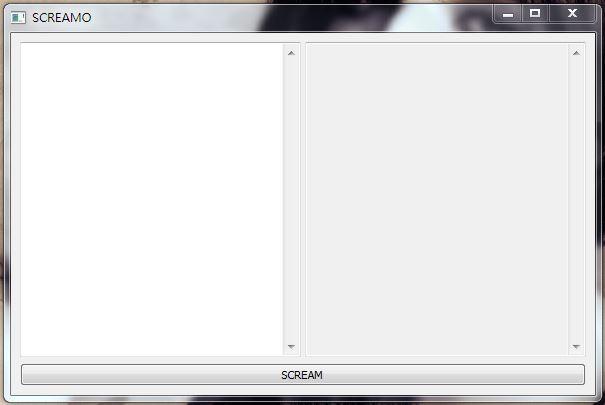
    var inTE, outTE *walk.TextEdit

    MainWindow{
        Title:   "SCREAMO",
        MinSize: Size{600, 400},
        Layout:  VBox{},
        Children: []Widget{
            HSplitter{
                Children: []Widget{
                    TextEdit{AssignTo: &inTE},
                    TextEdit{AssignTo: &outTE, ReadOnly: true},
                },
            },
            PushButton{
                Text: "SCREAM",
                OnClicked: func() {
                    outTE.SetText(strings.ToUpper(inTE.Text()))
                },
            },
        },
    }.Run()
}
建立 gui.manifest
<?xml version="1.0" encoding="UTF-8" standalone="yes"?>
    <assembly xmlns="urn:schemas-microsoft-com:asm.v1" manifestVersion="1.0">
        <assemblyIdentity version="1.0.0.0" processorArchitecture="*" name="SomeFunkyNameHere" type="win32"/>
        <dependency>
            <dependentAssembly>
                <assemblyIdentity type="win32" name="Microsoft.Windows.Common-Controls" version="6.0.0.0" processorArchitecture="*" publicKeyToken="6595b64144ccf1df" language="*"/>
            </dependentAssembly>
        </dependency>
    </assembly>
為你的執行檔增加圖案
找一個喜歡的 .ico 圖檔
如果這步驟省略, 以下的步驟要記得把 -ico gui.ico 拿掉
建立一個產生執行檔的腳本
因為一直下指令很麻煩, 所以建立一個 gen_exe.bat, 改完 .go 檔, 執行它就可以幫你產生執行檔了
c:\Go\bin\gen_exe.bat :
set GOARCH=386
set GOOS=windows
c:\go\mygo\bin\rsrc.exe -manifest gui.manifest -ico gui.ico -o gui.syso
go build -ldflags="-H windowsgui"
加上 -ldflags="-H windowsgui" 產生的執行檔就不會有醜醜的 cmd 背景
產生執行檔
雙擊 gen_exe.bat, 會產生 bin.exe, GUI 就已經包在裡面了

Linux (Cross-Compile)
這個範例不包含 GUI
Install
go get github.com/akavel/rsrc
事前準備
-
找一個喜歡的圖並轉成 .ico (選項, 可省略)
-
建立 gui.manifest
 <assembly xmlns="urn:schemas-microsoft-com:asm.v1" manifestVersion="1.0">
     <assemblyIdentity version="1.0.0.0" processorArchitecture="*" name="SomeFunkyNameHere" type="win32"/>
     <dependency>
         <dependentAssembly>
             <assemblyIdentity type="win32" name="Microsoft.Windows.Common-Controls" version="6.0.0.0" processorArchitecture="*" publicKeyToken="6595b64144ccf1df" language="*"/>
         </dependentAssembly>
     </dependency>
 </assembly>
產生執行檔
-
將gui.ico, gui.manifest 放同層目錄
-
建立 cross-compile 的 shell 檔, 方便未來發佈
deploy.sh :
#!/bin/bash
if [ -f gui.syso ]; then
    rm gui.syso
fi

GOOS=linux     GOARCH=amd64 go build
GOOS=darwin    GOARCH=amd64 go build -o example.command
rsrc -manifest gui.manifest -ico gui.ico -o gui.syso
GOOS=windows   GOARCH=amd64 go build -o example.exe
如果沒有 .ico 圖, 要記得把 -ico gui.ico 拿掉
-
執行
./deploy.sh
[註] Detection at compile time
golang 提供在 compile 時為不同環境準備不同的變數, 只要額外新增 _windows.go, _unix.go, 如下 :
Windows : /project/path_windows.go :
package project
const PATH_SEPERATOR = '\\'
Unix : /proejct/path_unix.go :
package project
const PATH_SEPARATOR = '/'
ref : https://inconshreveable.com/04-30-2014/cross-compiling-golang-programs-with-native-libraries/