介紹
Gearman 是可以在 backgroud 做事的 job worker
安裝 Gearman
可參考apple boy安裝步驟
如果一直安裝失敗可以執行以下試看看 :
sudo apt-get update
sudo apt-get upgrade
Persistent Storage : MySQL
預設 queue 是存在記憶體, 如果重開或 server crash, queue 就不見了, 所以我們需要一直永久存放 queue 的地方, 詳細可參考官方文件的說明
設定 /etc/default/gearman-job-server
PARAMS="-q mysql --mysql-host=localhost --mysql-user=root --mysql-db=test --mysql-table=gearman_queue"
PARAMS="-q mysql –mysql-host=localhost –mysql-user=xxxx –mysql-password=xxxxx–mysql-db=gearman –mysql-table=gearman_queue"
搭配 MySQL, 使用 test DB, 建立 gearman_queue 資料表
mysql -u root
> use test;
> CREATE TABLE IF NOT EXISTS `gearman_queue` (
>   `unique_key` VARCHAR(64) DEFAULT NULL,
>   `function_name` VARCHAR(255) DEFAULT NULL,
>   `priority` INT(11) DEFAULT NULL,
>   `data` longblob,
>   `when_to_run` INT(11) DEFAULT NULL,
>   UNIQUE KEY `unique_key` (`unique_key`,`function_name`)
> ) ENGINE=InnoDB DEFAULT CHARSET=utf8;
- 一定要加上 primary key ? .. 不確定, 參考語法 :
ALTER TABLE gearman_queue ADD COLUMN `id` INT(10) UNSIGNED PRIMARY KEY AUTO_INCREMENT;
安裝 gearman API extension
pecl install channel://pecl.php.net/gearman-1.1.0
建立 /etc/php5/conf.d/gearman.ini (預設不存在)
extension=gearman.so
重啟 apache2
測試是否安裝成功
php -i | grep gearman
或看 phpinfo 搜尋 gearman
測試 gearman
worker.php
<?php
$worker = new GearmanWorker();
$worker->addServer(); // ______ localhost
$worker->addFunction('content', 'writeContent');
while($worker->work()) {
    sleep(5); // ______________ CPU ________
}
function writeContent ($job)
{
    $data = unserialize($job->workload());
    file_put_contents($data['file_path'], $data['content'], FILE_APPEND);

    echo "Writing content is done.\n\n";
    return "done !";
}
每 5 秒執行一次 job
client :
<?php
$client = new GearmanClient();
$client->addServer(); // ______ localhost

// get content
$file_path = '/var/www/gearman/test';
$random = uniqid(md5(rand()));

$contentData = array(
    'file_path' => '/var/www/gearman/test',
    'content' => "random string : {$random}\n",
);
$client->doBackground('content', serialize($contentData));
echo "Content sending is done.\n";
- 執行一個 job
- job 內容是在 test 檔案最下面新增一行亂數 string
首先執行幾個 job
test@server:/var/www/gearman$ php client.php
Content sending is done.
test@server:/var/www/gearman$ php client.php
Content sending is done.
test@server:/var/www/gearman$ php client.php
Content sending is done.
執行了 3 次, 所以 mysql 應該會有 3 筆 job
mysql> select * from gearman_queue;
+--------------------------------------+---------------+----------+-----------------------------------------
-----------------------------------------------------------------------------------+-------------+----+
| unique_key                           | function_name | priority | data
                                                                                   | when_to_run | id |
+--------------------------------------+---------------+----------+-----------------------------------------
-----------------------------------------------------------------------------------+-------------+----+
| 07e32f6e-39a9-11e3-a226-51311deaabd9 | content       |        1 | a:2:{s:9:"file_path";s:21:"/var/www/gear
:"content";s:62:"random string : 2f58db93c9ea5194a32ccafaa199e17352640c057f178
";} |           0 | 45 |
| 09b01140-39a9-11e3-98d2-35e0215e492c | content       |        1 | a:2:{s:9:"file_path";s:21:"/var/www/gear
:"content";s:62:"random string : 66887b7529f4febdd0aa3dcfd1b7a39952640c0893241
";} |           0 | 46 |
| 0a5191aa-39a9-11e3-947c-b396c882ad21 | content       |        1 | a:2:{s:9:"file_path";s:21:"/var/www/gear
:"content";s:62:"random string : b1aba74b60afbd1db1f38b04b865b4b152640c09a1662
";} |           0 | 47 |
+--------------------------------------+---------------+----------+-----------------------------------------
-----------------------------------------------------------------------------------+-------------+----+
3 rows in set (0.00 sec)
test 檔, 檔案本身存放一筆資料 :
test@server:/var/www/gearman$ tail -f test
random string : e03adeb9683f95764753a7741ff810bd5260f5ef989fc
當執行 worker 後, 每一次執行 job 就會新增一行 random string
執行 worker :
test@server:/var/www/gearman$ php worker.php
就開始執行了~ 每5秒就會執行一次 job
所以 test 最後會有 4筆資料:
test@server:/var/www/gearman$ tail -f test
random string : e03adeb9683f95764753a7741ff810bd5260f5ef989fc
random string : 2f58db93c9ea5194a32ccafaa199e17352640c057f178
random string : 66887b7529f4febdd0aa3dcfd1b7a39952640c0893241
random string : b1aba74b60afbd1db1f38b04b865b4b152640c09a1662
而 mysql 原本存放的 3 筆 job, 因為執行後就會自動刪掉
mysql> select count(*) from gearman_queue;
+----------+
| count(*) |
+----------+
|        0 |
+----------+
1 row in set (0.19 sec)
queue 存放在 mysql 的新增跟刪除的動作, 全部是交由 gearman 做, 我們完全不用動手處理, 相當方便!
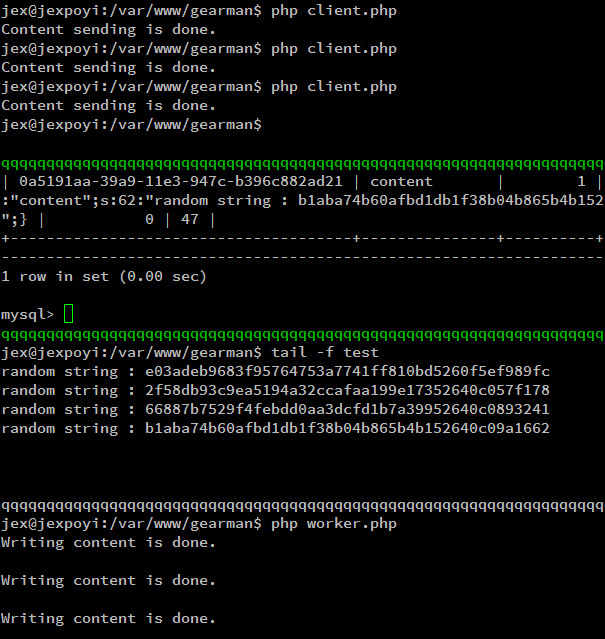
執行結果 :
ref :
http://blog.wu-boy.com/2013/06/how-to-install-gearman-on-ubuntu-or-debian-with-mysql/
http://www.phamviet.net/2012/10/10/ubuntu-php-5-4-x-and-gearman-troubleshooting/